 Pagalba
 Kontaktai
 Atsiliepimai
 Verslui
 Varlė
Varlė


Krepšelis tuščias
Turite Varlės paskyrą?
Prisijunkite, kad pamatytumėte krepšelio turinį
Prisijungti

 Visos prekės


 Krepšelis
Tuščias
Prekių
Krepšelis
Krepšelis
Tuščias
Prekių
Krepšelis
Prisijunkite, kad pamatytumėte krepšelio turinį
Prisijungti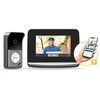

 4.5
4.5

 4.5
4.5

 Į krepšelį

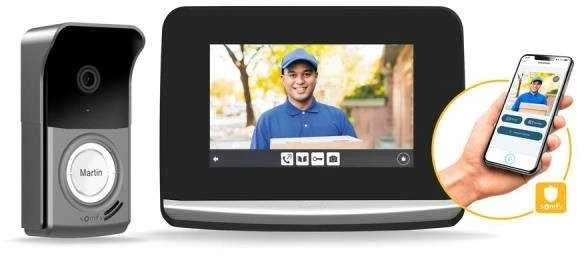
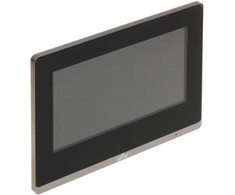
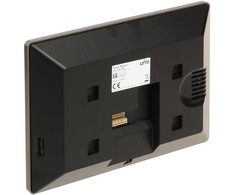
Thanks to its touch screen and customizable interface, the V500 is so intuitive that anyone can operate it.
Customise your ringtone - there are five to choose from or upload your own using the micro SD card. You can also check the outside temperature on the internal monitor, for example.
Thanks to the intercom function, you can communicate with another monitor, for example on the second floor of the house.
The motion detection function automatically activates the monitor when sensing from 30cm. The display diagonal is 7 inches, resolution 800 x 480px.
Directly integrated into the display is a 5-channel io transmitter that allows you to control up to 5 io products or 5 groups of io products. Connect your outdoor blinds or lights and easily control them from the comfort of your Videophone's display.
Additional buttons control the opening of the gate or the electric lock on the gate.
Communicate with your visitor thanks to the built-in microphone.
Easily get to know your visitors thanks to the wide-angle lens, even at night! The videophone features night vision with infrared LEDs. In addition, you can view your visit history in the videophone's memory and find out who rang your doorbell when you were away from home or just fast asleep. The unit stores up to 400 visitor images in memory. A 16 GB SD memory for photos is included
You can use your existing doorbell wiring as recommended in the manual. Follow the instructions to start the system and program it, the interface will guide you step by step.

 Dirbtinio intelekto nuomonė
 4
2024-06-08
4
2024-06-08
 4-6 d. d.
 5-6 d. d.
 7-10 d. d.
 4-8 d. d.
 7-10 d. d.
 5-8 d. d.
 5-8 d. d.
 4-8 d. d.
 4-6 d. d.
 4-6 d. d.

 5.0
1-2 d. d.
5.0
1-2 d. d.
 2-4 d. d.

 3 d. d.
 7 d. d.
 3-5 d. d.
 8-12 d. d.
 5.0
2-4 d. d.
5.0
2-4 d. d.
 6-7 d. d.


 LP Express paštomate liepos 21 d.
 Omniva paštomate liepos 21 d.
 DPD paštomate liepos 21 d.
 Venipak paštomate liepos 21 d.
 SmartPosti paštomate liepos 21 d.


